
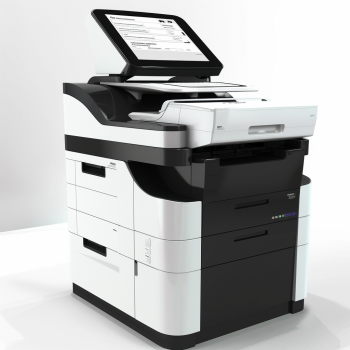
When you're considering renting a copier for your business, the process doesn't stop with just choosing a machine. Proper Rental Copier Setup and Installation is crucial to ensure that the equipment runs efficiently and meets your business needs. Whether you’re new to copier rentals or looking to optimize your existing setup, this guide will walk you through everything you need to know about setting up and installing your rented copier.
Why Proper Setup and Installation Matter
Renting a copier is often a cost-effective solution for businesses that need high-quality printing without the upfront cost of purchasing the equipment. However, an improper setup or installation can lead to inefficiencies, costly downtime, and reduced productivity. To avoid these issues, it's essential to follow the correct procedures when setting up and installing your rental copier.
Key Steps in Rental Copier Setup and Installation
1. Assess Your Business Needs
Before choosing a rental copier, assess your business's specific needs. Consider factors like the volume of printing, color printing requirements, and whether you need additional features such as scanning, faxing, or finishing capabilities. This will help you select a copier model that suits your business, ensuring you don’t overpay for features you don’t need.
For more insights on how to select the right model, check out this article on factors affecting copier rental prices.
2. Choose the Right Location
The copier’s location is critical for its performance. Ensure the area is well-ventilated, with sufficient space for the machine and easy access for maintenance. If you're using a color copier, you might want to place it in an area with proper lighting to ensure accurate color printing. Avoid placing the copier in areas with extreme temperatures or high humidity.
3. Check Electrical Requirements
Make sure the area where you plan to place the copier has the correct electrical outlets and power supply. Many copiers require specific power ratings, so it’s essential to verify that the outlet meets the manufacturer's requirements to prevent power issues or damage to the copier.
4. Network Setup
Modern copiers are often network-enabled, allowing for wireless and wired printing, scanning, and faxing. If your copier has networking capabilities, you’ll need to ensure it’s properly connected to your office network. This involves configuring the copier’s IP address, connecting it to Wi-Fi, or running an Ethernet cable.
Your IT team should be involved in this process to ensure a seamless connection between the copier and your network.
5. Install Copier Software
Once the hardware is in place, installing the copier’s software on your computer network is the next step. Most copiers come with installation CDs or downloadable software for managing print jobs, scanning documents, and setting user permissions. Follow the on-screen instructions to complete the installation, and don’t forget to install any necessary drivers for your devices.
Many rental companies also offer remote installation support, so make sure to reach out to your service provider if you need assistance.
6. Run Tests and Calibration
After the copier has been set up and software installed, it’s important to run several test prints to ensure that everything is working correctly. This is the time to check print quality, test the speed, and ensure that all functions (e.g., scanning, faxing, copying) are operating properly.
You may also want to calibrate the copier to optimize color accuracy, especially for color printers. Regular calibration ensures consistent output, which is vital for business documents like presentations and marketing materials.
7. Train Staff on Usage
Ensure that your staff knows how to operate the copier. Many rental copiers come with a user manual, but it can be helpful to have a demonstration from your rental provider on how to use the copier’s advanced features. This can minimize operational mistakes and maximize the efficiency of your copier.
For additional support, you can also consider hiring a trainer to provide hands-on guidance for your team.
Ongoing Maintenance and Support
After the installation and initial setup, ongoing maintenance is necessary to ensure your copier continues running smoothly. This includes tasks like:
Regularly replacing toner and paper
Cleaning the copier's internal parts
Addressing any error messages or malfunctions promptly
Scheduling routine service checks from the rental provider
For cost-effective maintenance and tips on how to save money on copier rentals, check out this post on saving money on copier rentals.
Renting vs. Buying: What's the Best Option?
When considering a copier for your business, you may wonder whether it’s better to rent or buy. Renting offers many benefits, such as flexibility, lower upfront costs, and access to the latest technology without long-term commitment. However, buying may make sense for businesses that have high-volume printing needs and prefer to own their equipment.
To help you decide, read our cost comparison of renting vs. buying a copier.
Budgeting for Copier Rentals
Renting a copier involves more than just the rental fee. Be sure to account for other costs such as:
Maintenance and servicing
Supplies (e.g., toner, paper)
Insurance and delivery charges
Knowing how to budget effectively will ensure that you get the best value for your money. Learn how to properly budget for copier rentals in this detailed guide on how to budget for copier rentals.
Conclusion
Proper Rental Copier Setup and Installation is essential for ensuring that your business enjoys maximum productivity and efficiency. By following the steps outlined in this guide, you’ll be well on your way to optimizing your copier rental experience. Remember to assess your needs, set up the copier correctly, and maintain it regularly for the best results.
If you’re ready to get started or want to learn more about the latest copier technology, check out Marga Enterprises for more options and support. For additional tips and insights, follow us on our YouTube channel for more updates.
For a complete overview of copier rental services, visit Marga Enterprises.
Key Takeaways:
Assess your business needs to select the right copier model.
Choose the correct installation site and ensure the proper setup.
Maintain regular maintenance to avoid costly repairs and downtime.
Renting a copier doesn’t have to be complicated. With the right setup and maintenance, your copier will be a valuable asset to your business.
FAQs about Rental Copier Setup and Installation
What factors should I consider when selecting a location for my rental copier?
- Consider factors such as space availability, accessibility, proximity to power sources and network connections, and potential disruptions to workflow.
How important is it to read the copier's installation manual before setup?
- It's crucial. The manual provides essential guidance on proper installation procedures, safety precautions, and troubleshooting tips, ensuring a smooth setup process.
What steps are involved in unpacking and assembling the rental copier?
- Carefully unpack the copier and its accessories, then follow the manufacturer's instructions to assemble paper trays and install toner cartridges systematically.
What are the options for connecting the copier to power and office networks?
- You can connect the copier to power sources using the provided cable and configure basic power settings. For network connectivity, choose between Ethernet or Wi-Fi, following the manufacturer's instructions for configuration.
How do I install necessary software and drivers for the copier?
- Download the latest software versions from the manufacturer's website and follow the installation instructions provided. This software facilitates communication between the copier and office devices.
What maintenance practices should I implement to keep the copier running smoothly?
- Regular maintenance tasks include cleaning the machine, replacing consumable components like toner cartridges, and following recommended maintenance intervals outlined in the copier's manual.
What support services are included in rental agreements?
- Rental agreements typically include maintenance and technical support services, ensuring prompt assistance and troubleshooting when needed.
How can I contact Marga Enterprises for consultation or specific rental options?
- You can reach out to Marga Enterprises at 09171642540 / 09614481276 / 02-721-69-415 or email them at marga.enterprises2013@gmail.com for inquiries and assistance with rental copiers.
Conclusion
Correctly setting up and installing your rental copier is fundamental to achieving optimal performance and durability. By following these guidelines, you can ensure that your office operations run smoothly and efficiently.
Mastering Rental Copier Setup and Installation is a multifaceted endeavor that requires attention to detail and a commitment to excellence. By following the manufacturer's guidelines and embracing the support and maintenance services offered by Marga Enterprises, you pave the way for seamless operations and unparalleled efficiency. Take the first step towards optimizing your office setup today by reaching out to Marga Enterprises for consultation and explore specific rental options. Contact us at 09171642540 / 09614481276 / 02-721-69-415 or email us at marga.enterprises2013@gmail.com.
With this comprehensive guide at your disposal, you're well-equipped to embark on the journey towards unlocking the full potential of your rental copier. From pre-installation preparation to routine maintenance, each step plays a vital role in ensuring optimal performance and reliability. Trust in Marga Enterprises to provide the support and expertise you need to succeed in today's fast-paced business environment.
This expanded version of the guide provides comprehensive insights and detailed instructions to ensure a smooth and successful Rental Copier Setup and Installation process. By following these guidelines and leveraging the support services offered by Marga Enterprises, you can maximize the efficiency and reliability of your office copier, empowering your team to achieve greater productivity and success.
For further support with your copier setup or to explore more about our rental options, please visit our website or contact our expert team.